How does myRUC electronic RUC service work?

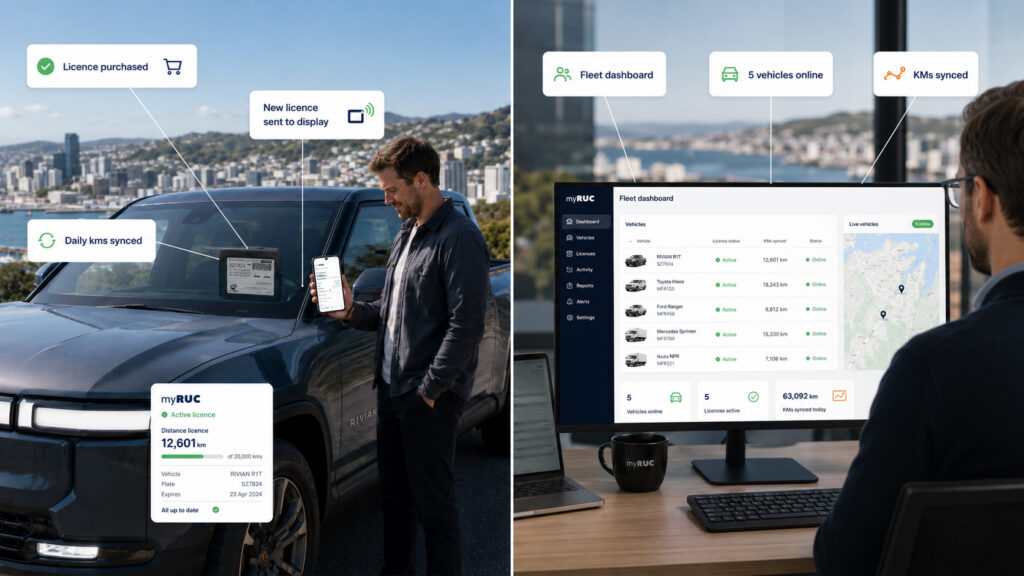
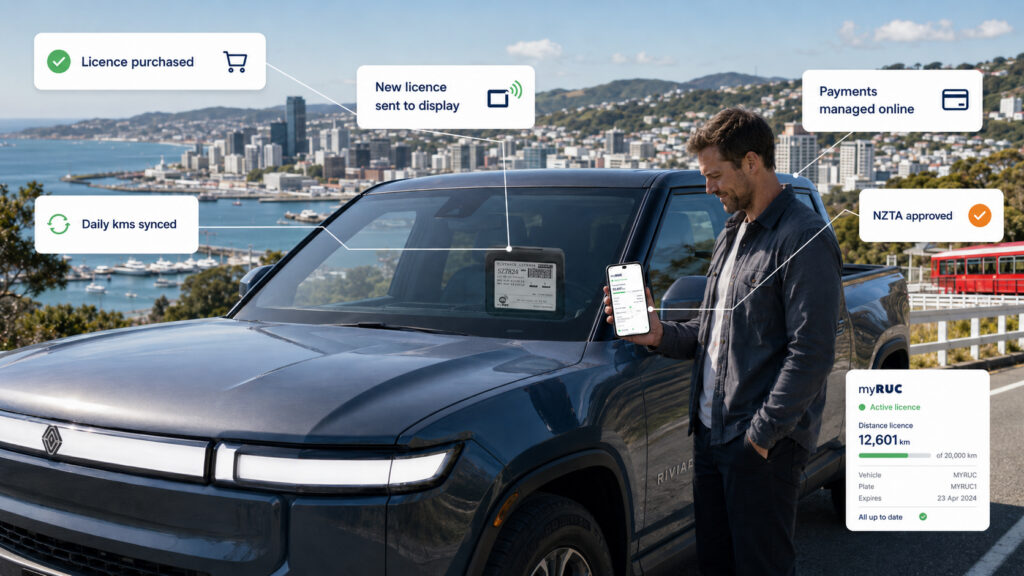
The myRUC electronic RUC service has three parts. The first is an electronic display facing outwards held inside the windscreen of your vehicle. The second part is the myRUC app on your Android or IOS mobile. The third part, tying these all together is the myRUC web portal where the connection to the app and Waka Kotahi are kept. The portal holds all the details of the vehicle and the appropriate RUCs.

The app holds the current RUC, the payment portal, the current kms recording, the Min & Max on the current license and the ability to update the display as required. It also enables updating the kms to the on-dash odometer. This entry should be updated every few months if you are a stand-alone myRUC user. We have integrated partner GPS providers who can enable Auto-RUC purchase and renewals for you. For Fleet Managers we have the myRUC Pro option which is best suited for remotely managing your RUC administration, please contact us for a quote.

Posted in FAQ

What myRUC changes

For many New Zealand fleet operators, road user charge management still takes too much time. Drivers need to know when distance is running low, admin teams need to check balances, and managers need confidence that every vehicle stays compliant without chasing paper labels or last-minute renewals.

As fleet size grows, that manual process becomes harder to control. What works for one or two vehicles often breaks down when multiple drivers, different routes, and varying monthly distances are involved.

What myRUC changes

myRUC replaces the old paper-based approach with a digital system that is easier to manage day to day. Instead of relying on printed labels and manual tracking, operators can manage road user charging through a connected process designed for real vehicle use.

That means less guesswork, fewer interruptions, and a clearer way to stay on top of compliance.

Good compliance systems should reduce admin pressure, not add to it.

Key benefits for fleet managers

  • Less time spent checking licence distance manually
  • Better visibility across multiple vehicles
  • Fewer compliance surprises
  • A cleaner process for drivers and admin teams
  • More confidence when vehicles are on the road every day

How the process works in practice

A typical workflow starts with installing the myRUC display hardware in the vehicle and connecting it to the platform. From there, road user charging information can be managed in a more structured way, helping fleets avoid the stop-start friction that often comes with manual RUC handling.

  1. Set up the vehicle with the correct myRUC product
  2. Track usage and charging status through the digital workflow
  3. Review activity across the fleet when needed
  4. Keep vehicles compliant without relying on paper-based reminders

Why this matters for growing fleets

Once a fleet expands, small inefficiencies multiply quickly. A few missed checks can become repeated admin tasks. A process that depends on one person remembering every renewal point is difficult to scale. myRUC gives operators a more modern foundation for managing this part of fleet compliance.

It is especially useful for businesses that want a simple experience for drivers while giving managers a clearer operational picture behind the scenes.

Choosing the right setup

Different operators need different levels of visibility and workflow support. Some want a straightforward in-vehicle setup for individual drivers. Others need more control across multiple vehicles and teams. The best setup usually depends on fleet size, reporting needs, and how hands-on the day-to-day management needs to be.

Final thoughts

Road user charging is a necessary part of operating diesel and RUC-eligible vehicles in New Zealand, but it does not need to stay manual and time-consuming. A better system should help fleets stay compliant while reducing day-to-day admin.

If your team is spending too much time managing RUC manually, myRUC offers a more practical way forward.

Talk to the myRUC team to find the right setup for your vehicles.
Posted in RUC

Why fleet RUC management becomes a bottleneck

For many New Zealand fleet operators, road user charge management still takes too much time. Drivers need to know when distance is running low, admin teams need to check balances, and managers need confidence that every vehicle stays compliant without chasing paper labels or last-minute renewals.

As fleet size grows, that manual process becomes harder to control. What works for one or two vehicles often breaks down when multiple drivers, different routes, and varying monthly distances are involved.

What myRUC changes

myRUC replaces the old paper-based approach with a digital system that is easier to manage day to day. Instead of relying on printed labels and manual tracking, operators can manage road user charging through a connected process designed for real vehicle use.

That means less guesswork, fewer interruptions, and a clearer way to stay on top of compliance.

Good compliance systems should reduce admin pressure, not add to it.

Key benefits for fleet managers

  • Less time spent checking licence distance manually
  • Better visibility across multiple vehicles
  • Fewer compliance surprises
  • A cleaner process for drivers and admin teams
  • More confidence when vehicles are on the road every day

How the process works in practice

A typical workflow starts with installing the myRUC display hardware in the vehicle and connecting it to the platform. From there, road user charging information can be managed in a more structured way, helping fleets avoid the stop-start friction that often comes with manual RUC handling.

  1. Set up the vehicle with the correct myRUC product
  2. Track usage and charging status through the digital workflow
  3. Review activity across the fleet when needed
  4. Keep vehicles compliant without relying on paper-based reminders

Why this matters for growing fleets

Once a fleet expands, small inefficiencies multiply quickly. A few missed checks can become repeated admin tasks. A process that depends on one person remembering every renewal point is difficult to scale. myRUC gives operators a more modern foundation for managing this part of fleet compliance.

It is especially useful for businesses that want a simple experience for drivers while giving managers a clearer operational picture behind the scenes.

Choosing the right setup

Different operators need different levels of visibility and workflow support. Some want a straightforward in-vehicle setup for individual drivers. Others need more control across multiple vehicles and teams. The best setup usually depends on fleet size, reporting needs, and how hands-on the day-to-day management needs to be.

Final thoughts

Road user charging is a necessary part of operating diesel and RUC-eligible vehicles in New Zealand, but it does not need to stay manual and time-consuming. A better system should help fleets stay compliant while reducing day-to-day admin.

If your team is spending too much time managing RUC manually, myRUC offers a more practical way forward.

Talk to the myRUC team to find the right setup for your vehicles.